You have the idea.
Let Alfred handle the code.
A visual workspace where you drag, drop, and describe what you want — and AI squads build it. No terminal. No coding required. Just pure creation.
🎨 For designers, founders, creators, and anyone with an idea
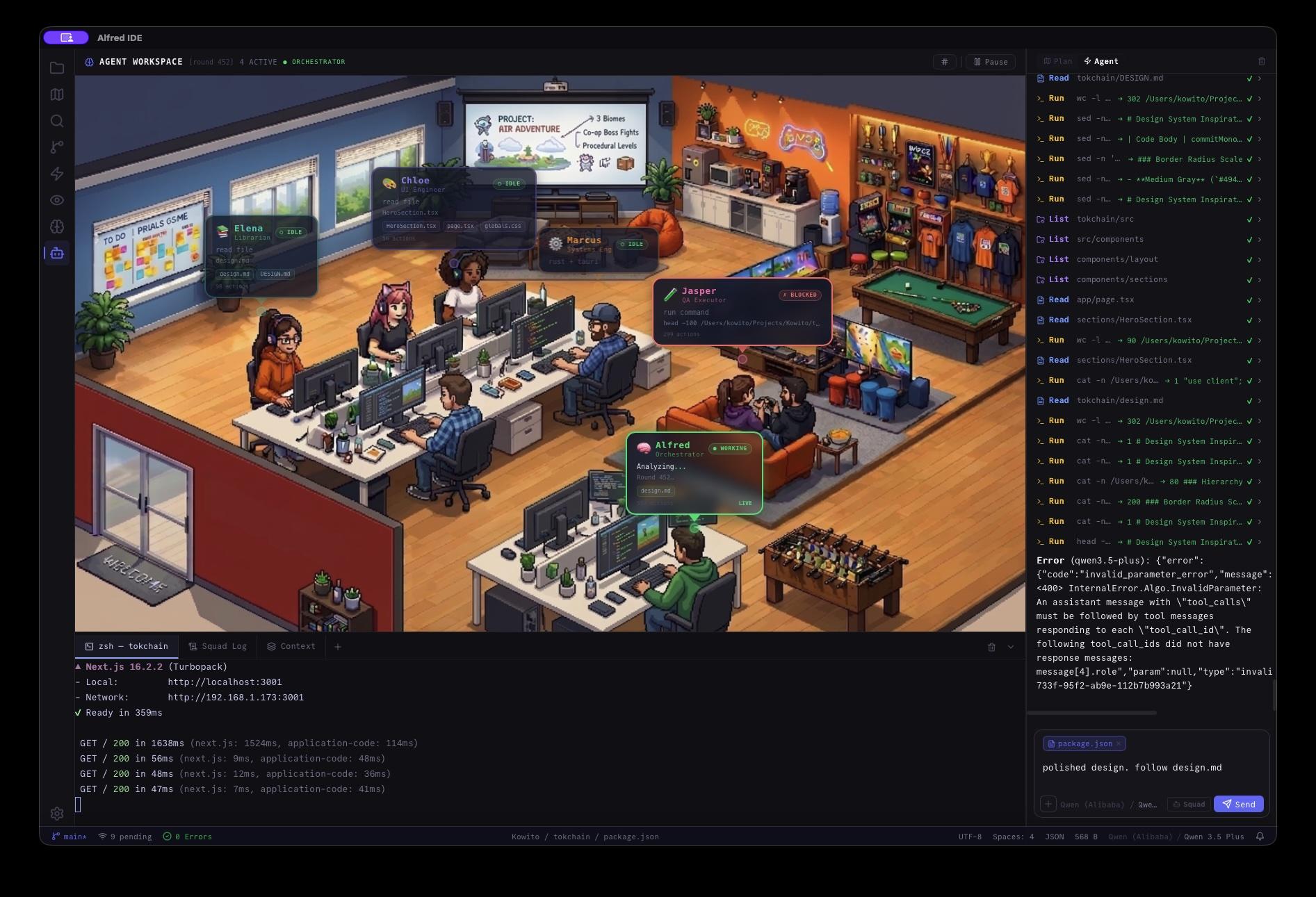
Four panels. One workspace.
Alfred is a visual environment — not a terminal wrapper. Every part of the agentic workflow has a dedicated UI panel you can see and control in real time.
Drag, drop, assign. No Jira. No spreadsheets.
Break down features into tasks on a visual board. Assign each card to a human developer, an AI agent, or a mixed squad. Move work from Backlog → In Progress → Review → Done — all in one screen.
Assign to anyone
Each task card can be assigned to a human, a single AI agent, or a full Squad. Alfred auto-selects the right agents based on the task type.
Add rate limiting to API
AgentWrite onboarding docs
YouMigrate auth to JWT
Squad ×3Fix session leak bug
AgentStripe checkout flow
YouAssigning shards · monitoring constraints · 3 agents active
Mapping JWT surface area
Writing middleware — auth.ts:42
Generating integration tests
Watch your squad work live. Each agent gets its own lane.
You can see who's coding, who's reviewing, who's testing — all in parallel. The Orchestrator coordinates hand-offs and enforces constraints. You supervise; they execute.
What's a Squad?
1 Orchestrator + N specialized agents (architect, implementer, reviewer) working in parallel. You set the goal — the Squad divides the labor.
Your entire codebase — mapped and explorable.
Alfred builds a living visual graph of every service, API, dependency, and design pattern in your project. Every agent action is grounded in this graph. Every change links back to a source you can inspect. No hallucinations.
↳ Click any node to jump directly to the source file, commit, or PR that created it.
lib/jwt modified by Backend Implementer · 2 dependents updated automatically
Tell agents what to know — no prompt engineering.
The context editor lets you add focus windows, constraints, and success criteria visually — like editing a document. Alfred converts them into grounded instructions for every agent. No YAML. No manually crafted prompts.
Context as a first-class editor
Every constraint you add is version-controlled and visible. The whole team sees what agents are allowed to do — and what they're not.
Four panels. Every tool you need.
Alfred isn't a chat window with AI bolted on. It's a purpose-built visual environment — every panel is designed for a specific part of the agentic workflow.
Visual task management for humans and agents.
Break down any feature into cards. Assign them to yourself, an agent, or a full Squad. Track progress through Backlog → In Progress → Review → Done — without touching a project management tool.
Live visibility into every agent running your code.
Each agent gets its own lane in the monitor. Watch who's coding, who's reviewing, who's testing — in real time. The Orchestrator manages hand-offs and constraint enforcement. You stay in control without micromanaging.
Your codebase — mapped, linked, explorable.
Alfred builds a living graph of every service, API, dependency, and design pattern in your project. Every agent action is grounded in this map. Click any node to jump to the source. Zero hallucinations — everything links back to real code.
Control what agents know — visually.
Add focus windows, constraints, and success criteria like editing a document. Alfred converts your visual instructions into grounded context for every agent. No YAML files. No prompt engineering. Just clear, version-controlled rules.
Context syncs from
Auto-detected on connect. No manual setup.
The visual workspace vs. the terminal prompt.
CLI-based AI tools are powerful — but they hand you a fire hose. Alfred gives you control valves. The GUI is the competitive advantage.
Feature
Alfred
CLI-Based Tools (Claude Code, etc.)
Task Planning
Visual Kanban board — drag, drop, assign to agents
Manual prompts or external tools (Jira, Notion, spreadsheets)
Agent Monitoring
Live Squad Dashboard — per-agent lanes with real-time status
Text logs only — scroll to find what went wrong
Context Management
Visual Context Editor — add constraints like a document
Markdown / YAML files — manually maintained, easy to drift
Codebase Understanding
Interactive Knowledge Graph — clickable, cited, always current
Token stuffing — paste in files and hope the model tracks it
Team Collaboration
Shared workspace with visual hand-offs between humans and agents
Copy-pasting prompts and hoping everyone uses the same context
GUI
First-class visual environment — built for it
None — terminal only
CLI tools are great for one-off tasks. Alfred is built for teams that want ongoing, visible, controllable agentic development.
Simple, transparent pricing. Deposit once. Use forever.
No subscriptions. No expiration. Every dollar you deposit is converted 100% into credits you can spend whenever you need them.
Want a custom amount? Contact us — 100% of any deposit converts to credits.
What you can actually build
Credits translate directly into real development outcomes.
Costs vary by mode. Eco Mode is efficient and fast. Genius Mode uses more credits but engages deeper reasoning for complex challenges.
Starter
500 credits · $5
Complete a REST endpoint with tests, or refactor ~2,000 lines of code
Builder
2,750 credits · $25
Build a full dashboard from your DB schema, or migrate auth from sessions to JWT
Squad Launch
12,000 credits · $100
Rebuild a legacy API in a modern framework (including tests and docs)
Example: “Add Stripe checkout to /pricing and write an integration test.”
Eco Mode
Fast. Efficient. Sufficient.
Lightning-fast generation, perfect for boilerplate, refactors, and straightforward tasks. Fewer credits per task.
Model class
Claude 3.5 Haiku · GPT-4o Mini class
Genius Mode
Complex missions. Frontier reasoning.
Advanced reasoning, multi-step planning, and squad coordination. Engages our most capable models.
Model class
Claude Sonnet 4 · GPT-4o class
Toggle mode right inside Alfred, per task. No complex configuration.
Why developers prefer this over subscriptions
No monthly bills
Deposit once — we convert 100% to credits. No recurring charge ever.
No credit expiry
Your balance waits until you need it — whether that's next week or next year.
Scale at your own pace
Start with $5, see the value, upgrade only when you're ready.
Clear cost-per-outcome
You always know roughly what a feature or refactor will cost before you run it.
Start with $5 and see Alfred refactor your first component, generate a test suite, or build an endpoint — all within minutes. No strings attached.
Deposit $5 and get startedEvery dollar deposited goes 100% toward credits. No setup fees. No subscriptions.
Built on shipped code
Real engineers. Real manifests. Real PRs merged.
Trusted by developers at
Frequently Asked Questions
Still have questions? Contact our team →
Choose Your Workflow
Agile is for humans who need to talk. Agentic Software Squads are for agents that need to execute. Which one do you want building your future?
Subscribe for rollout updates, manifest templates, and enterprise-safe ASSET messaging packs.
No spam, ever. Unsubscribe at any time. Privacy Policy